How to use Queuey
A tour of every screen, so you know what everything means before you're in the queue. Tap a number on a picture to jump to what it means.
The ride list
Queuey's main screen: every ride in the park you choose, best first, refreshed every 30 seconds.
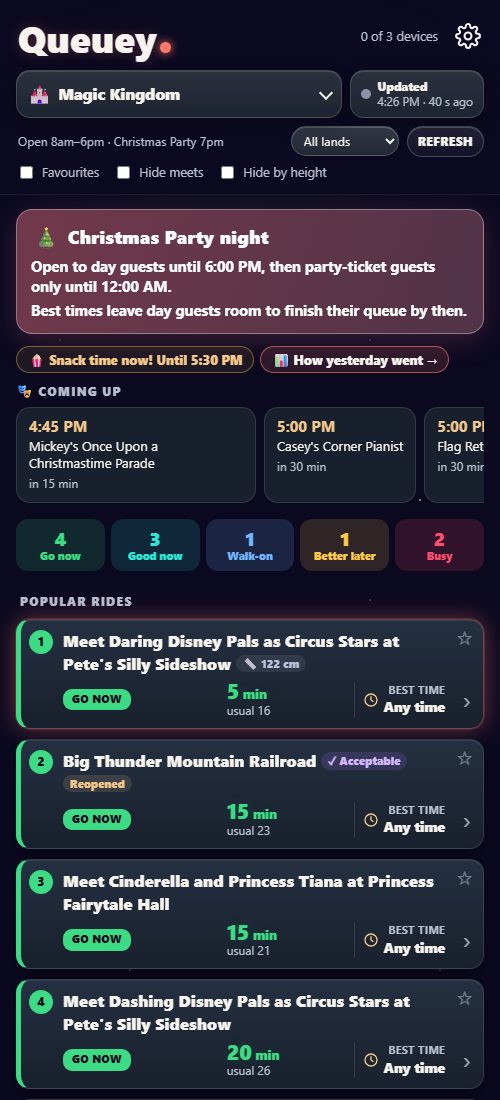
- The park. Tap to switch between Magic Kingdom, EPCOT, Hollywood Studios and Animal Kingdom. Queuey remembers the last one.
- Updated. When the waits were last posted. New waits usually reach you within a minute; if they're running late, Queuey tells you.
- Today's hours, land and Refresh. The park's hours, with Early Entry, Extended Evening or a party when there is one. Choose a land to see only its rides. The list refreshes itself; Refresh fetches it now.
- Filters. Show only your favourites, hide character meets, or hide rides above the height you set in Settings.
- Settings (the gear), with how many of your 3 devices are signed in. See Settings.
- Notes for today. Things worth knowing right now: on party nights, when day guests have to leave; Snack time, the park's busiest hour, a good time to sit down and eat; and How yesterday went (see Yesterday).
- Coming up. The next parades, fireworks and shows in this park, with how long until each. Swipe for more.
- Rides by verdict. How many rides are Go now, Good now, Walk-on, Better later or Busy at this moment. Tap one to show only those rides.
- The verdict, and the card's colour. What Queuey thinks of this queue right now (see what the verdicts mean). The best rides to join now are at the top, numbered.
- The wait now and the usual. The big number is Disney's posted standby wait. "Usual" is how long this queue normally is at this time on this kind of day; once Queuey has seen a couple of hours of today, it's adjusted for how busy today is.
- Best time. When this queue is usually shortest for the rest of today. "Any time" means it barely changes, so there's no point waiting.
- Tags beside the name. ✓ Acceptable: the wait is within the limit you set for this ride in Settings. Reopened: it was down and has just reopened, so the queue may build again. 📏 122 cm: its minimum height is above the height you set.
- Favourite. Tap the star to keep a ride in your favourites; the Favourites filter then shows just those.
Tap any ride for its chart and more detail (see A ride's chart). Rides that are closed are at the bottom, with how long they've been down; rides closed for longer (refurbishments) are folded away under Closed for a while.
What the verdicts mean
Go now: much shorter than usual, shorter than its usual for the day overall, and unlikely to drop much later today. Join it.
Good now: well below usual, or 20 minutes or less. Worth joining, though it may drop later (the ride's chart says when).
Walk-on: 10 minutes or less.
Typical: about what it usually is at this time.
Better later: a bit longer than usual, and it usually drops later today.
Wait: much longer than usual, and it usually drops later. Busy: much longer than usual, and it usually doesn't.
No usual yet: Queuey hasn't seen this ride for enough days to say what's usual. No queue: shows and walk-throughs with no posted wait.
A ride's chart
Tap a ride in the list to see its day so far.
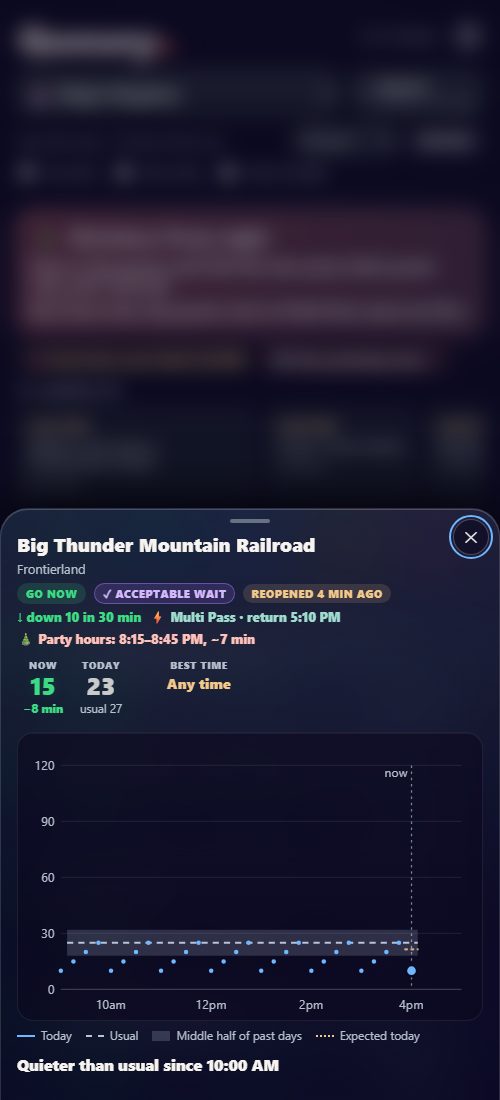
- The ride and its land. Close it with the ✕.
- Verdict and tags, as on the card, written out in full.
- Trend and Lightning Lane. Whether the posted wait has moved up or down in the last half hour. If you've told Settings your party has Lightning Lane, the next return time (and the price for Single Pass rides). You book Lightning Lane in Disney's app; Queuey only shows it.
- Party hours. On party nights, the quietest half hour for party-ticket guests after day guests leave.
- Now, today and usual. The posted wait now and how it compares; "Today" is the usual adjusted for how busy today is.
- Best time for the rest of today, and the usual wait then.
- The chart. Today's posted waits (the line), the usual wait (dashed), and the range most past days fell in (the shaded band), up to now. Where today sits against the band tells you whether it's a busy day for this ride.
- How today compares, in a sentence: for example, "Quieter than usual since 10:00 AM".
Settings
Tap the gear at the top. Changes apply to every phone on your pass when you tap Save.
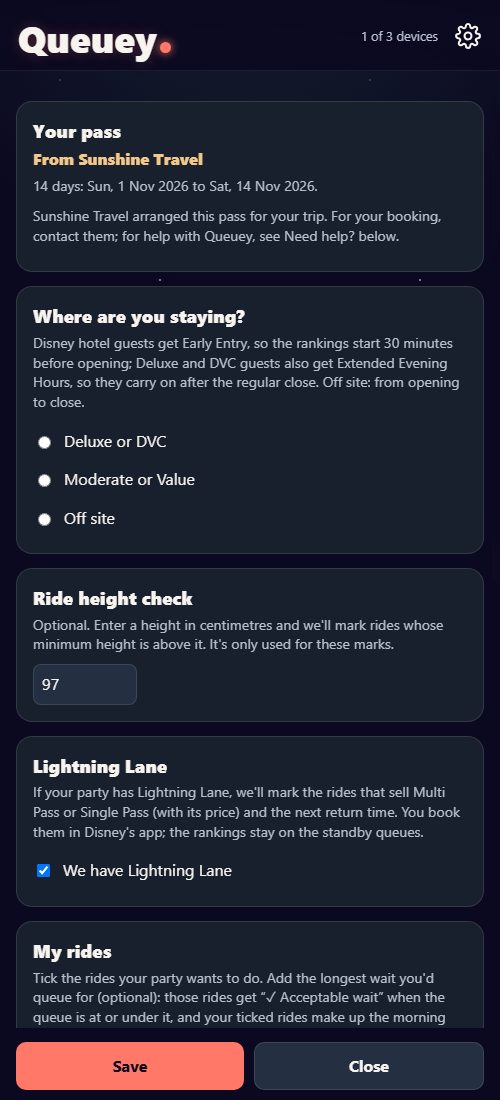
- Your pass: its dates, and the travel company if one arranged it.
- Where you're staying. Disney hotel guests get Early Entry, so the rankings start 30 minutes before opening; Deluxe and DVC guests also get Extended Evening Hours. Off site: from opening to close.
- Ride height check (optional). Enter a height and rides whose minimum is above it are marked, and can be hidden with the "Hide by height" filter. It's only used for these marks, and isn't kept for your next trip.
- Lightning Lane. Tick it if your party has Lightning Lane: rides that sell it show the next return time. The rankings stay on the standby queues.
- My rides. Tick the rides your party wants to do, land by land. Add the longest wait you'd queue for and those rides get "✓ Acceptable" when the queue is at or under it. Your ticked rides also make up your plan before opening (see Before opening).
- Save when you're done. Further down Settings: your devices (sign one out to free a place: a pass works on 3 at once), Emails before the trip, Add to your Home Screen, and Sign out.
Yesterday
Tap How yesterday went in the notes above the list to see how each ride's last full day compared with usual. Handy for planning: a ride that was busy all yesterday is worth doing early.
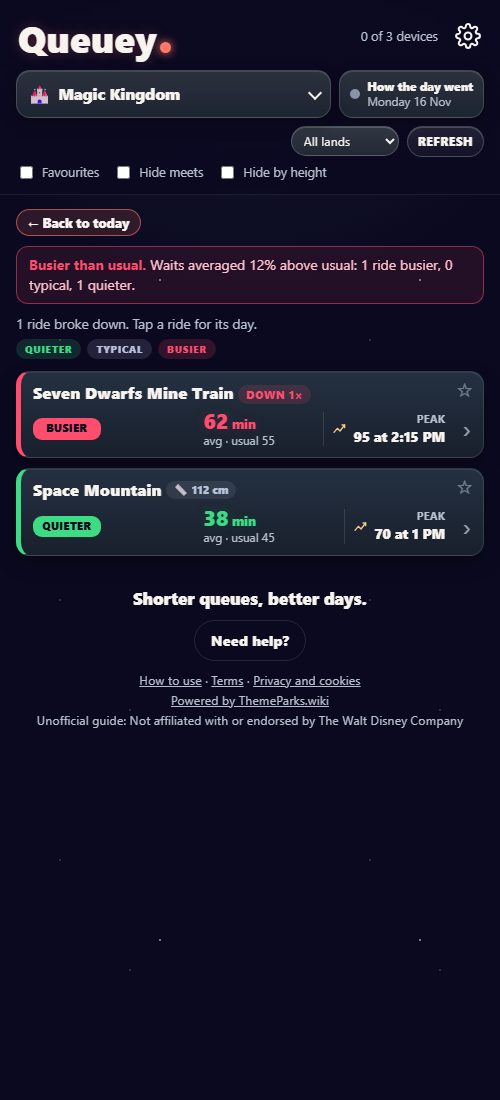
- Back to today returns to the live list.
- The park overall: whether yesterday was busier or quieter than usual, and by how much.
- Breakdowns: how many rides broke down. Tap a ride to see when.
- The verdict: Quieter, Typical or Busier than usual over the day.
- Average and usual: the ride's average posted wait over the day, and its usual over the same hours.
- Peak: the longest posted wait, and when.
- Down: how many times the ride broke down. Its chart shows when, and for how long.
Yesterday appears once Queuey has written the day's summary, in the early hours (Orlando time).
Before opening
Before a park opens, and for its first hour, a box at the top of the list plans your morning. With no rides ticked in Settings, it's Do these first: the rides whose queues usually grow the most after opening. With rides ticked in My rides, it's your own rides, with the usual wait for each at the start of the day. At Early Entry the list starts 30 minutes before the regular opening, if you've told Settings you're staying at a Disney hotel.
Add Queuey to your Home Screen
Queuey is a web app: nothing to download. Add it to your Home Screen and it opens full screen, like an app.
iPhone: open Queuey in Safari, tap Share, then Add to Home Screen. Then open it from the new icon and sign in there (a sign-in in Safari doesn't carry over to the icon).
Android: open Queuey in Chrome and tap Install when it's offered, or the ⋮ menu, then Add to Home screen.
Tips
- Patchy signal? The last good list stays on screen, with how old it is, until you're back online.
- Up to 3 devices can be signed in at once. A 4th signs out the one used least recently. Share your key with your party, no one else.
- Before your trip, a free demo day with your own ride choices shows how it works.
- Need help? The button at the bottom of the app opens Help and support, with answers to common questions and a contact form.